
Make sure you completed all the steps in No sound. This article only covers the physical checks that come after.
Choose your model:
- Unö & Duö V2 (floor, ladder and lift)
- Möve
- Höp
- Unö & Duö V1 (lift)
- Möbil
Not sure which model you have? Identify my model
Follow the steps for your model in order and note the result of each step.
Steps for Unö & Duö V2
What you need:
- A ladder and a lift
- A phone or a laptop with a headphone jack
- A phone with the EV QuickSmart Mobile app
- A Phillips screwdriver
On these models, the sound travels from the computer to the projector through the HDMI cable, then from the projector to the first speaker through an audio cable. A second cable connects the first speaker to the second speaker.
⚠ Note: If your Lü has no speakers on the lighting module and plays through your building's sound system, these steps do not apply. Contact us.
Part A: From the floor (no ladder)
Step 1: Check the speaker lights
- From the floor, look at the front of each speaker. The power light is just under the EV logo, at the bottom of the front grille.
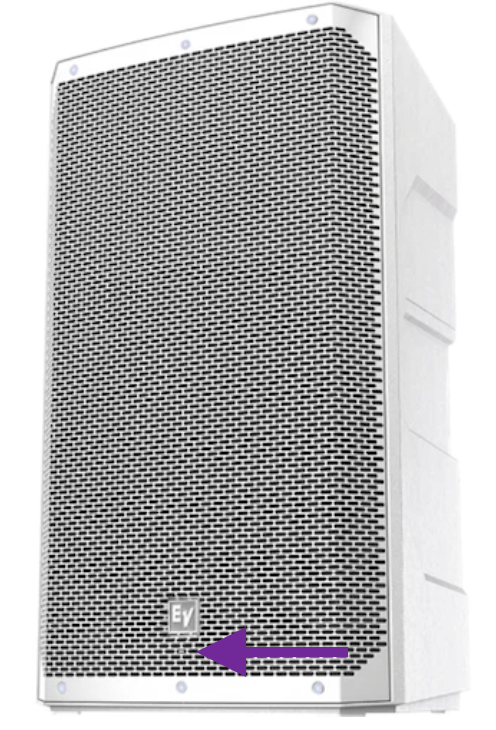
Light on, on both speakers? The speakers have power. Go to step 2.
Light off on a speaker? Note which speaker, then go to step 2.
Step 2: Test the speakers with the EV app
- On your phone, download the EV QuickSmart Mobile app (App Store or Google Play).
- Open the app and connect to the speakers by Bluetooth. Two speakers should appear.
Connected to both speakers, and sound comes out? The speakers work. Go to step 3.
Cannot connect to a speaker, or no sound comes out of it? Note which speaker, then go to step 3.
Part B: At the Heart (ladder required)
The Heart module is installed above the screen. It contains the computer.
Step 3: Check the HDMI cable at the computer
- Remove the screw identified by the yellow arrow. The cover is fixed with a steel cable, so you can let it hang in the air once you have removed the screw.
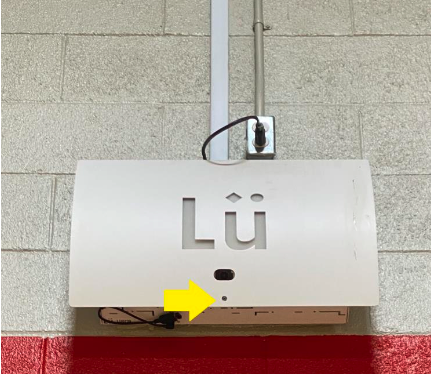
- Remove the three screws holding the LED panel to reach the back of the computer.
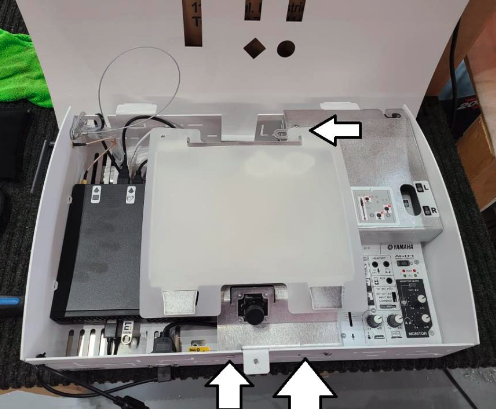
- Find the Lü HDMI cable at the back of the computer. Depending on your computer, it connects directly or through a small adapter.
- Disconnect the Lü HDMI cable, then reconnect it firmly. If there is an adapter, disconnect and reconnect it too.
- Play a sound in the Lü app.
Sound back? You're done.
Still no sound? Go to step 4.
Part C: At the projector and the speakers (lift required)
Step 4: Check the cables at the projector
- At the back of the projector, disconnect the HDMI cable, then reconnect it firmly.
- Find the audio cable plugged into the AUDIO OUT jack of the projector. Disconnect it, then reconnect it firmly.
- Play a sound in the Lü app.
Sound back? You're done.
Still no sound? Go to step 5.
Step 5: Check the speaker power
If you could connect to both speakers with the EV app in step 2, the speakers have power. Still check that their cables are securely connected and not damaged.
- On each speaker, make sure the power cable is securely connected at both ends: at the speaker and at the lighting module, and that it is not damaged.
- Make sure the power switch of each speaker is set to ON.
- Check that the power light turns on. It is just under the EV logo, at the bottom of the front grille.
Light on, on both speakers, and sound back? You're done.
Light still off on a speaker? This speaker is most likely defective. Contact us.
Both lights on, but still no sound? Go to step 6.
Step 6: Test the sound without the projector
This step requires a phone or a laptop with a headphone jack.
- Unplug the audio cable from the AUDIO OUT jack of the projector.
- Plug this cable into the headphone jack of your phone or laptop.
- Play music on your phone or laptop at medium volume.
Music comes out of the speakers? The speakers and cables work: the projector is not sending the sound. Reconnect the cable to the projector and contact us.
No music? Reconnect the cable to the projector and go to step 7.
Step 7: Test the second speaker on its own
- On the second speaker, disconnect the cable that comes from the first speaker.
- On the first speaker, disconnect the cable that comes from the projector.
- Connect the cable that comes from the projector to the second speaker, in the input where the other cable was.
- Play a sound in the Lü app.
Sound comes out of the second speaker? The first speaker or the cable between the two speakers is defective.
No sound from the second speaker? The cable that comes from the projector is most likely defective.
In both cases, reconnect all the cables as they were and go to step 8.
Step 8: Send us your results
Contact us with your results. We can then go straight to the solution.
Steps for Möve
On Möve, the sound system is inside the head and the base. Checking it requires opening the unit, which must be done by trained personnel only. Do not open the unit yourself.
Contact us and tell us the result of the steps in No sound.
Steps for Höp
Höp is the newest solution in the Lü ecosystem, and its help content is on the way. In the meantime, contact us: we will guide you step by step.
Steps for Unö & Duö V1
What you need:
- A lift
- A phone or a laptop with a headphone jack
The computer sits on top of the Light and Sound module, the large unit hung from the ceiling. The speakers are also on this module. All the modules are installed high up: you need a lift for all the steps.
At the Light and Sound module (lift required)
Step 1: Check the speaker power
- Make sure the power switch of each speaker is turned on.
- Make sure the power cable of each speaker is securely connected at both ends: at the speaker and at the power strip inside the Light and Sound module.
- Make sure the power strip is turned on.
Sound back? You're done.
Still no sound? Go to step 2.
Step 2: Check the speaker volume
- At the back of each speaker, find the volume knob.
- Make sure it is set to 0 dB and not turned all the way down.
Sound back? You're done.
Still no sound? Go to step 3.
Step 3: Check the audio cables
- On the computer, make sure the audio cable (3.5 mm jack) is firmly plugged in.
- Make sure the other end of this cable is firmly connected to the audio input of the first speaker.
- Make sure the cable between the two speakers is firmly connected at both ends.
- Play a sound in the Lü app.
Sound back? You're done.
Still no sound? Go to step 4.
Step 4: Test the speakers with another device
This step requires a phone, a tablet or a laptop with a headphone jack.
- Unplug the audio cable (3.5 mm jack) from the computer.
- Plug this cable into the headphone jack of your phone, tablet or laptop.
- Play music on the device at medium volume.
Music comes out of the speakers? The speakers and cables work: the computer is not sending the sound. Reconnect the cable to the computer and contact us.
No music? Reconnect the cable to the computer and go to step 5.
Step 5: Swap the speakers
- Connect the audio cable from the computer to the second speaker instead of the first one.
- Connect the cable between the two speakers so that the first speaker now receives the sound from the second one.
- Play a sound in the Lü app.
Note which speaker plays and which one does not. Reconnect all the cables as they were and go to step 6.
Step 6: Send us your results
Contact us with your results. We can then go straight to the solution.
Steps for Möbil
On Möbil, the speakers are on brackets on each side of the main module (the head on the lifting tower). If needed, lower the Möbil to its lowest position with the crank to reach them.
Step 1: Check the speaker power and volume
- Make sure both speakers are turned on.
- Make sure the volume of each speaker is not set to zero.
Sound back? You're done.
Still no sound? Go to step 2.
Step 2: Check the audio cables
- Find the audio cable (XLR) that connects each speaker to the main module.
- Make sure each cable is plugged into the OUT connector of the main module, and not into a light arm.
- Make sure the other end is firmly plugged into the IN connector of the speaker.
- Play a sound in the Lü app.
Sound back? You're done.
Still no sound? The next checks are inside the main module. Opening it must be done by trained personnel only. Do not open it yourself. Go to step 3.
Step 3: Send us your results
Contact us with your results. We can then go straight to the solution.
If the problem persists, contact us
Fill out the contact form and include:
- Your Lü serial number (LU####) (how to find it)
- Your model
- The steps you tried and the result of each
- The exact error message, if any
- A photo or video of the problem
- Unö & Duö V2: the color of the Heart light
- A photo of the light on each speaker