
Make sure you completed all the steps in Microphone not working. This article only covers the physical checks that come after.
Choose your model:
- Unö & Duö V2 (ladder)
- Möve
- Höp
- Unö & Duö V1
- Möbil
Not sure which model you have? Identify my model
Follow the steps for your model in order and note the result of each step.
Steps for Unö & Duö V2
What you need:
- A ladder
- The microphone transmitter, turned on and charged
- A Phillips screwdriver
Part A: At the Heart (ladder required)
The Heart module is installed above the screen. The microphone receiver is inside, in the top-right corner, and a part of it sticks out of the Heart.
Step 1: Check the receiver lights
- Turn on the transmitter, set to MIC.
- From the ladder, look at the lights on the part of the receiver that sticks out of the Heart.
No light at all? Go to step 2.
Red light, solid or flashing? The receiver battery is low. Go to step 3.
Blue light, but no green light? The receiver is on but not paired with the transmitter. Go to step 4.
Green light flashing? There is interference. Go to step 5.
Green light on, not flashing? The receiver works and is paired with the transmitter. Go to step 6.
Step 2: Check that the Heart has power
Look at the Lü logo on the front of the Heart.
The logo is lit? The Heart has power: the receiver battery is empty. Go to step 3.
The logo is off? The Heart has no power: the receiver gets its power from the Heart. Follow Lü Won't Power On.
Step 3: Charge the receiver battery
The receiver has its own battery, charged by the Lü. It can run low when the Lü was left unpowered for a while.
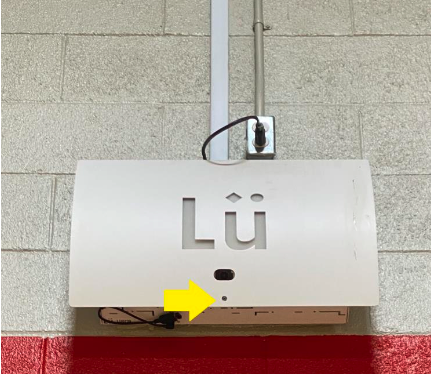
- Remove the screw identified by the yellow arrow. The cover is fixed with a steel cable, so you can let it hang in the air once you have removed the screw.
- Remove the three screws holding the LED panel.
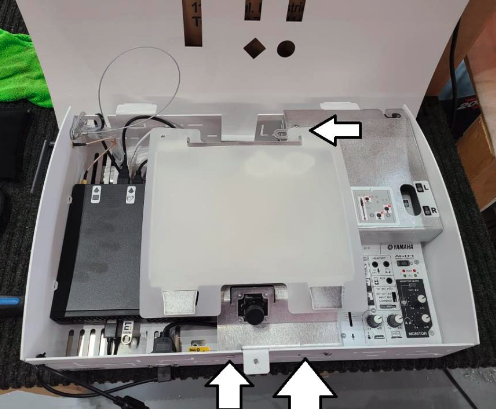
- Remove the aluminum plate in the top-right corner to reach the receiver.
- Find the small rectangular power switch, between the XLR connector and the blue light. Do not press the round button next to it: it changes the channel.
- Set the switch to OFF and leave it off for a few hours. Keep the Lü on during this time: the receiver charges through the Heart.
- Set the switch back to ON and look at the receiver light.
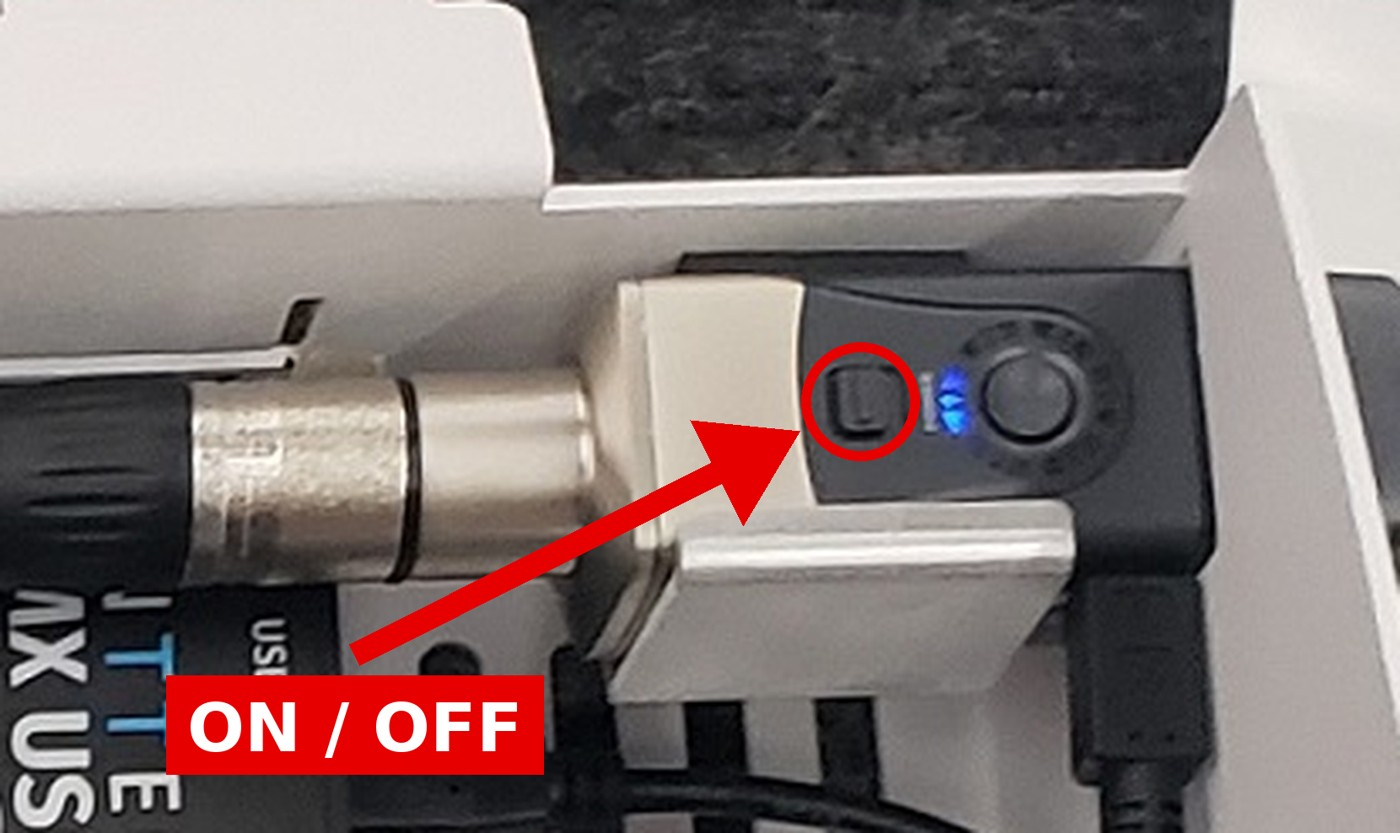
Blue light? The battery is charged. Turn on the transmitter and go to step 4.
Still red? The battery is still low. Set the switch to OFF again for a few more hours, then check again. Repeat until the light is blue.
Step 4: Pair the receiver with the transmitter
- Turn on the transmitter, set to MIC, and wait a few seconds.
- If the receiver light stays blue, check the channel. The transmitter and the receiver must be on the same channel: channel 1 on an Unö and on the primary unit of a Duö, channel 4 on the secondary unit of a Duö. The blue light shows the channel.
- Take the transmitter out of its blue case. Press the round channel button on the transmitter, then the round channel button on the receiver, until both are on the same channel. On the receiver, you can press the button with the tip of a pen. If the channel does not change, double-click the button to unlock it.
Green light? The receiver is paired. Test the microphone. If it works, you're done: put the aluminum plate, the LED panel and the cover back.
Still blue on every channel? The transmitter or the receiver is defective. Go to step 7.
Step 5: Remove the interference
A flashing green light means the signal between the transmitter and the receiver is disturbed, often by Wi-Fi routers or other wireless devices.
- Move closer to the Heart with the transmitter.
- Change the channel on both the transmitter and the receiver, as shown in go to step 4. Try each channel until the green light stops flashing.
- Make sure no Wi-Fi router or other wireless transmitter is within 10 feet (3 m) of the Heart.
Green light no longer flashing? Test the microphone. If it works, you're done: put the aluminum plate, the LED panel and the cover back.
Still flashing? Go to step 7.
Step 6: Check the receiver cables
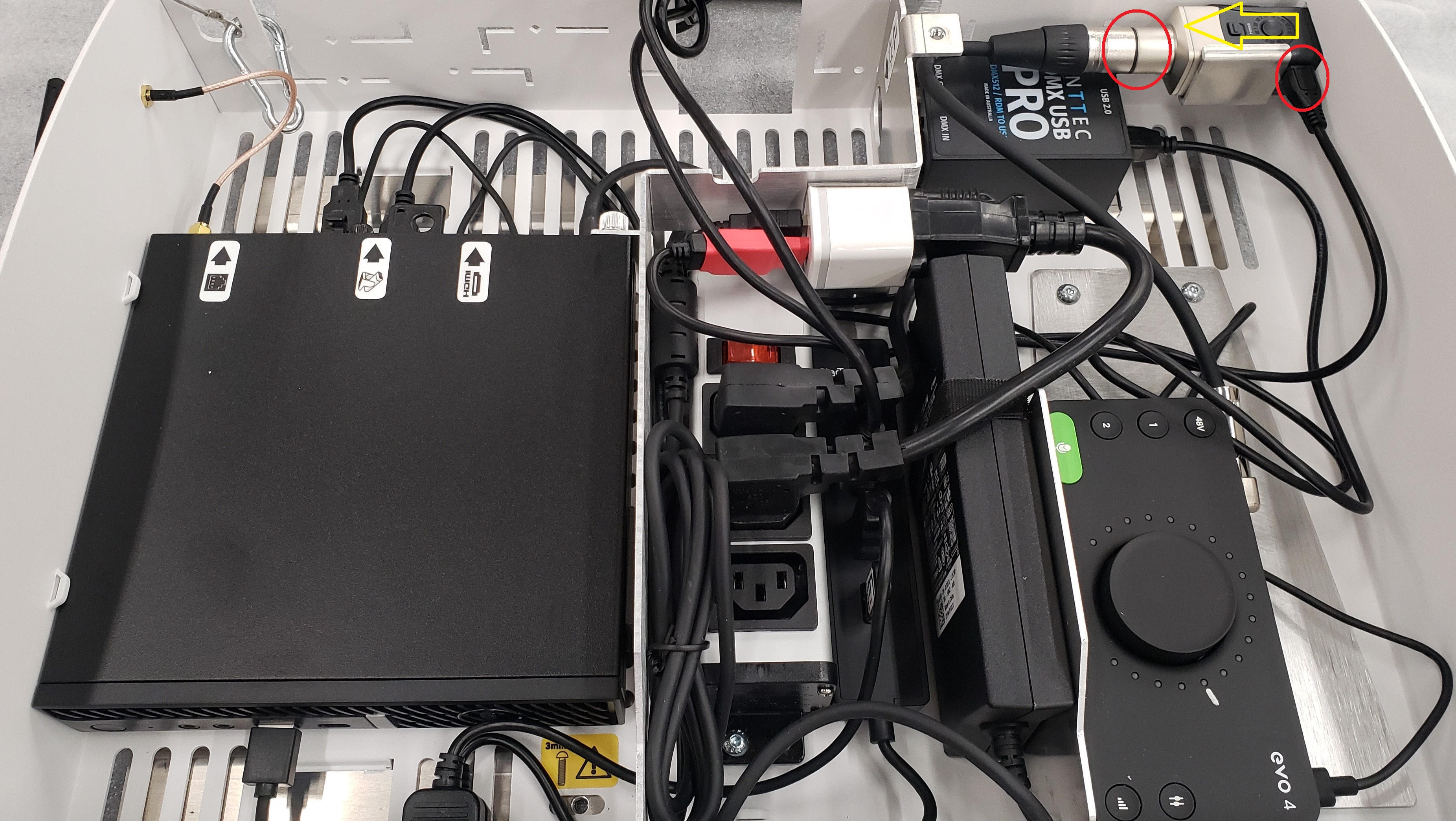
The receiver works. If your voice still does not come out of the speakers, open the Heart as shown in step 3, actions 1 to 3.
- Disconnect the two cables of the receiver, one at a time, then reconnect each one firmly.
- Test the microphone.
Your voice comes out of the speakers? You're done: put the aluminum plate, the LED panel and the cover back.
Still no voice? Go to step 7.
Step 7: Send us your results
Put the aluminum plate, the LED panel and the cover back. Then contact us with your results. We can then go straight to the solution.
Steps for Möve
This article does not apply to this model.
Steps for Höp
Höp is the newest solution in the Lü ecosystem, and its help content is on the way. In the meantime, contact us: we will guide you step by step.
Steps for Unö & Duö V1
This article does not apply to this model.
Steps for Möbil
This article does not apply to this model.
If the problem persists, contact us
Fill out the contact form and include:
- Your Lü serial number (LU####) (how to find it)
- Your model
- The steps you tried and the result of each
- The exact error message, if any
- A photo or video of the problem
- The lights you see on the microphone receiver (red, green or none)
- The channel shown on the transmitter