
To find out which version of Windows is installed on your Lü, there are a few methods you can use. Each one provides a different set of details, so it's useful to know all of them.
Method 1: System Properties
- Select Start > Settings > System.
- Select About.
- You will see the Edition, Version, and OS Build information.
Method 2: Keyword search
Type one of the following keywords in the Windows search bar, then press Enter:
- winver: opens the About Windows window, which shows the version and build.
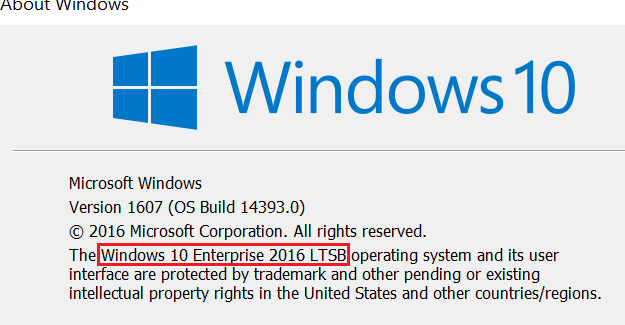
- msinfo or msinfo32: opens the System Information window, which shows full system details.

Tip: you can also run winver or msinfo32 directly from the Command Prompt.
Method 3: Command Prompt or PowerShell
- Type the following command, then press Enter to display the operating system name and version:
systeminfo | findstr /B /C:"OS Name" /B /C:"OS Version"
Note: this command only works on an English version of Windows. On a Windows installed in another language, the labels are translated (in French, for example: "Nom du système d'exploitation").
- Type
slmgr /dlv, then press Enter. This command displays detailed licensing information. On an LTSC edition, the output shows "EnterpriseS".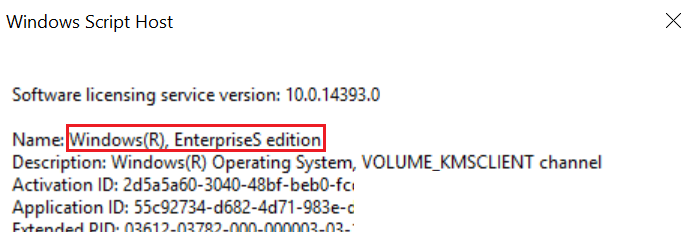
Additional notes
Long-Term Servicing Channel (LTSC, formerly LTSB): this build of Windows doesn't include many in-box applications, such as Microsoft Edge, Microsoft Store, Cortana (limited search capabilities are still available), Mail, Calendar, OneNote, Weather, News, Sports, Money, Photos, Camera, Music, and Clock. The LTSC model is primarily intended for specialized devices.
General Availability Channel: feature updates can be installed as soon as Microsoft releases them. This servicing model is ideal for pilot deployments, for testing Windows feature updates, and for users (such as developers) who need to work with the latest features right away. Once you've tested the latest release, you can choose when to roll it out broadly.
Source
Microsoft Learn: What version of Windows am I running?